sap-dev — The SIer Developer’s Manual
From a clean Windows laptop to deployed, ATC-clean ABAP — using Claude Code skills.
Audience: an ABAP developer/consultant at a System Integrator (SIer) who joins a customer project and wants to use the sap-dev plugins to generate and deploy custom code faster, without giving up control of the transport, the quality gate, or the production system.
Reading time: ~30 min. Hands-on first run: ~1 hour (most of it is one-time setup).
Table of contents
- What this toolkit is (and is not)
- The end-to-end picture
- Prerequisites — your workstation and your SAP user
- Install the plugins
- First-time setup (once per machine / per system)
- Tell the generator about your project — the Customer Brief
- Generate ABAP from a design document
- Deploy the code
- Quality gates — ATC and ABAP Unit
- Transport readiness, release, and STMS
- A complete worked example — and the
abap-developeragent - Day-2 skills: run, diagnose, fix, explain, migrate
- How the toolkit keeps you safe
- Troubleshooting & FAQ
- Appendix A — Full skill catalogue
- Appendix B — Settings reference
- Appendix C — ABAP naming & length limits
0. What this toolkit is (and is not)
sap-dev is a set of four Claude Code plugins — bundles of “skills” (/sap-…
slash commands) that drive a real SAP system from your own dialog user, over the
two standard interfaces SAP already ships:
- SAP GUI Scripting (VBScript driving SAP GUI for Windows) — for everything that is a transaction: SE38, SE37, SE24, SE11, SE91, SE01, ATC, …
- RFC via SAP .NET Connector (NCo 3.1) — for read-checks and fast-paths (table reads, FM signatures, transport status, activation verification).
| Plugin | Skills | What it gives you |
|---|---|---|
| sap-dev-core | 61 + abap-developer agent | Login & connection store, transport handling, the ABAP Workbench (SE38/SE37/SE24/SE11/SE91/SE16N/SE01/…), the ATC quality gate, ABAP-Unit runner, activation, diagnosis (ST22/SM13/SM12/SLG1/SM37), report & background-job execution, PC ↔ app-server file transfer, delivery assurance, and STMS import to QAS/PRD. |
| sap-gen-code | 12 | The spec → ABAP pipeline: read a design doc (Excel/Word/PDF), validate it, generate ABAP tailored to your project, and validate the result against the live system. |
| sap-migrate | 10 + cc-migration-engineer agent | S/4HANA custom-code migration as a tracked campaign. |
| sap-project | 40 + sap-consultant agent | Functional / operations delivery: test data (BP, Material, Sales Order), authorizations & roles, incident & interface diagnosis, release & transport ops, config compare, health checks, regression testing. Absorbed the former sap-tcd skills. |
What it is not
- It is not a robot that silently rewrites your customer’s production system. Every irreversible action (deploy, release, production import) is gated and asks you first. See §12.
- It does not write SQL against SAP standard tables — only through SAP’s own write
APIs (
BAPI_*,RPY_*,DDIF_*, …). Reads are always allowed. - It runs under your SAP licence with your authorizations. If you can’t create a package in SE21 by hand, the skill can’t either.
⚠️ Always start on a sandbox / DEV client. Per the project’s own license note: “Use against production systems at your own risk; always test against sandbox or development clients first.”
1. The end-to-end picture
The “happy path” for a new custom report or interface looks like this:
                        ┌─────────────────────────────────────────────┐
   ONE-TIME SETUP       │  install plugins → /sap-login → /sap-dev-init │
                        └─────────────────────────────────────────────┘
                                            │
        design doc (.xlsx/.docx/.pdf)       ▼
   ┌───────────────────────────────────────────────────────────────────┐
   │  GENERATE                                                          │
   │  /sap-docs-extract → (/sap-docs-convert) → /sap-docs-check         │
   │        → /sap-gen-abap → /sap-check-abap (+/sap-fix-abap)           │
   │  (docs-check runs ddic+process dimensions; check-abap covers        │
   │   naming·types·SQL·fm·syntax dimensions)                            │
   └───────────────────────────────────────────────────────────────────┘
                                            │   Z<PROG>.abap (+ sibling files)
                                            ▼
   ┌───────────────────────────────────────────────────────────────────┐
   │  DEPLOY                                                            │
   │  /sap-se11 (DDIC) → /sap-se91 (messages) → /sap-se38|se37|se24      │
   │            → /sap-activate-object  (text elements for reports)      │
   │  …each pulls a transport request via /sap-transport-request        │
   └───────────────────────────────────────────────────────────────────┘
                                            │
                                            ▼
   ┌───────────────────────────────────────────────────────────────────┐
   │  PROVE                                                             │
   │  /sap-atc  →  /sap-run-abap-unit                                    │
   └───────────────────────────────────────────────────────────────────┘
                                            │
                                            ▼
   ┌───────────────────────────────────────────────────────────────────┐
   │  SHIP                                                              │
   │  /sap-transport-readiness → /sap-se01 release → /sap-stms import   │
   │                                          DEV → QAS → (typed-SID) PRD │
   └───────────────────────────────────────────────────────────────────┘
You don’t have to use every step. The minimum useful loop is
/sap-login → write/paste ABAP → /sap-se38 → /sap-atc. Everything else exists to
make the loop trustworthy on a customer’s landscape.
You stay in the driver’s seat. Claude proposes; you approve. You can run any single skill standalone, in any order. The chain above is the recommended order, not a rail.
2. Prerequisites
2.1 Workstation
| Requirement | Why | Check |
|---|---|---|
| Windows 10 / 11 | SAP GUI Scripting is Windows-only; credentials are encrypted with Windows DPAPI | winver |
| SAP GUI for Windows 7.70+ | All transaction-driving skills | SAP Logon → About |
| SAP GUI Scripting enabled (client) | The VBScript engine must be allowed | see §2.3 |
| Claude Code CLI | The host that runs the skills | claude --version |
| SAP .NET Connector 3.1 (32-bit, .NET 4.0) (optional but recommended) | RFC fast-paths: TR status, FM signatures, activation verify, table reads | see §2.4 |
Python 3.10+ (required only for sap-gen-code) | The sap-gen-code document pipeline (/sap-docs-extract parses Excel/Word/PDF specs); the other plugins work without it | py --version |
Shell note (important for Windows). Launch
claudefrom whatever shell you like — cmd, PowerShell, Windows Terminal. It does not change how the skills run: they always use Windows PowerShell 5.1 + 32-bitcscriptinternally. You do NOT needpwsh. Do not setchcp 65001or “Beta: Use Unicode UTF-8” as a “fix” for CJK — that breaks legacy/SAP tools. CJK correctness is built into the skills. To merely see CJK characters, use Windows Terminal with a CJK font. (Full detail:docs/windows-shell-and-encoding-faq.md.)
2.2 SAP server-side switch
SAP GUI Scripting must be enabled on both sides. The server side is profile
parameter sapgui/user_scripting = TRUE (set in RZ11, made permanent in RZ10).
If your Basis team manages this, ask them to confirm it is TRUE on the DEV system.
A read-only check is built in — see /sap-doctor in §4.4.
2.3 Enable SAP GUI Scripting on your client
In SAP Logon → Options (Alt+F12) → Accessibility & Scripting → Scripting → tick Enable Scripting, and untick “Notify when a script attaches to SAP GUI” and “Notify when a script opens a connection” so the skills don’t stall on a popup. Restart SAP Logon afterwards.
2.4 SAP NCo 3.1 (RFC) — what to download
RFC features need SAP .NET Connector 3.1.
✅ Check first — you may already have it. If you installed SAP GUI 7.7, NCo 3.1 is often deployed into the GAC automatically. Before downloading anything, check whether both of these files exist:
C:\Windows\Microsoft.NET\assembly\GAC_32\sapnco\v4.0_3.1.0.42__50436dca5c7f7d23\sapnco.dll
C:\Windows\Microsoft.NET\assembly\GAC_32\sapnco_utils\v4.0_3.1.0.42__50436dca5c7f7d23\sapnco_utils.dll
If both are present, you’re done — no download or install needed. (The exact version folder may differ slightly; any
v4.0_3.1.0.*32-bitsapnco+sapnco_utilspair inGAC_32works.)
If they’re missing, the plugin does not ship SAP binaries — download them yourself from SAP Service Marketplace with your S-User account. You need the 32-bit, .NET Framework 4.0 build, installed into the GAC (the installer option “Install assemblies to GAC”). Everything still works without NCo, but the RFC-based verifications fall back to GUI-only or are skipped.
2.5 SAP authorizations you’ll want on DEV
You are acting as yourself. To run the full flow you need a developer who can:
S_DEVELOP— create/modify programs, FMs, classes, packages, function groups.S_CTS_ADMI/ transport authority — create and release transport requests (or have Basis pre-create a TR for you).- DDIC authority (
S_DDIC_ALLor equivalent) — create domains/data elements/structures. - A developer key / registration if your system still enforces SSCR (most modern systems don’t).
If you lack one of these, the relevant skill will fail loudly with the SAP error — it never pretends success.
3. Install the plugins
Inside a claude session, add the marketplace and install:
/plugin marketplace add https://github.com/sapdev-ai/sap-dev
/plugin install sap-dev-core@sap-dev
sap-dev-core is the foundation and the only mandatory plugin. Add the others as you
need them:
/plugin install sap-gen-code@sap-dev      # spec → ABAP generation
/plugin install sap-migrate@sap-dev       # S/4HANA custom-code migration
/plugin install sap-project@sap-dev       # functional / operations delivery, test data
ℹ️ Install one plugin per
/plugin installcommand — run the lines above individually. (Claude Code does not currently accept several plugins in a single/plugin install.)
Activate the new skills. After installing (or updating) plugins, reload so the
session picks up the new /sap-* skills:
/reload-pluginsIf you’re using the Claude desktop app (rather than the terminal CLI),
restart the app instead — /reload-plugins may not fully refresh the desktop’s
skill list.
Verify: type / and you should see /sap-login, /sap-dev-init, /sap-se38,
etc. in the slash-command list. If they’re still missing after /reload-plugins (or a
desktop restart), restart the claude session so it re-scans plugins.
You can also just talk to Claude. “Log in to my SAP DEV system”, “Create a data element ZHKDE_AMOUNT”, “Deploy this report” all dispatch to the right skill. The slash commands are the explicit form; natural language is the everyday form.
4. First-time setup
Three one-time actions: pick a work directory, save a connection, and bootstrap the dev environment.
4.1 Pick a work directory (recommended, durable)
Everything the toolkit writes — your saved connections, generated code, logs, caches —
lives under one work directory (default C:\sap_dev_work). Set it once at the
Windows-user level so it survives plugin updates:
# In a normal PowerShell window, once:
setx SAPDEV_AI_WORK_DIR "D:\sapdev"
The /sap-login onboarding will also offer to set this for you and writes a durable
pointer (%APPDATA%\sapdev-ai\work_dir.txt) so the current session picks it up
immediately. If you skip it, you simply get C:\sap_dev_work.
What lives under the work dir:
| Path | Holds |
|---|---|
runtime\connections.json | Your saved SAP connections (passwords DPAPI-encrypted) |
runtime\… | Session/broker state, per-connection dev defaults |
custom\ | Your project overrides: customer_brief.md, naming rules, conversion rules |
design_docs\ | Input design documents |
source_code\ | Generated ABAP + per-document work folders |
logs\ | Structured JSONL run logs (/sap-log-analyze reads these) |
cache\fm_signatures\ | Cached FM signatures, per system |
temp\ | Per-run scratch |
4.2 Save a SAP connection — /sap-login
Run:
/sap-login --addYou’ll be asked for the connection details. Provide them all at once — the skill reads SAP Logon’s own landscape too, so you can also just say “log in to my S4D pad entry”. There are two endpoint styles:
Application-server (direct) connection
| Field | Example |
|---|---|
sap_logon_description | S4H [S42022.example.com] |
sap_application_server | S42022.example.com |
sap_system_number | 00 |
sap_client | 100 |
sap_user | DEVUSER |
sap_password | •••••••• |
sap_language | EN |
Message-server (load-balanced) connection
| Field | Example |
|---|---|
sap_logon_description | S4D [msgsrv.example.com] |
sap_message_server | msgsrv.example.com |
sap_logon_group | PUBLIC |
sap_system_id | S4D |
sap_client | 100 |
sap_user | DEVUSER |
sap_password | •••••••• |
sap_language | EN |
What happens:
- Claude generates a one-shot login VBScript and connects through SAP GUI.
- If you ask, it verifies RFC connectivity through NCo.
- It offers to save the profile, encrypting the password with Windows DPAPI
(stored as
dpapi:…, decryptable only by your Windows account on this machine). - It pins this conversation to this connection so every later skill drives the
right system. If you open a second
claudeconversation on the same SAP system, a built-in session broker spawns a separate SAP session so the two don’t collide.
After login you land on the standard SAP Easy Access menu, now driven from the CLI.
Managing multiple customers / systems (you’ll have many):
/sap-login --list                 # show every saved profile
/sap-login --switch S4D           # switch this conversation to S4D (by SID)
/sap-login --switch S4D/200/DEV2  # disambiguate by SID/client/user
/sap-login --set-default S4D      # default target for new conversations
/sap-login --delete <id>          # remove a profile (asks first)
/sap-login --check                # health-check all profiles (RFC, DNS, live sessions)
Each conversation pins to one profile; subagents inherit the pin. That’s how you keep “my fix on customer A’s QAS” and “my build on customer B’s DEV” from ever crossing.
4.3 Bootstrap the dev environment — /sap-dev-init
/sap-dev-initThis is the “make my sandbox ready” step. It is idempotent — safe to re-run; it checks what exists and only creates what’s missing. It performs, in order:
- Auth check — confirms you have a live GUI session (and credentials for RFC).
- Self-heal — clears a stale/released dev transport request from your settings.
- Trust your work dir in SAP GUI Security (one-time per Windows account) — so the file-IO the skills do isn’t blocked by the SAP GUI Security popup.
- Transport request — asks your TR policy (see below) and resolves/creates a TR.
- Package — creates your dev package (default
ZCMDEVAI). - Function group — creates your function group (default
ZFGDEVAI). - DDIC scaffolding — domain
ZCMD_RFCVAL, data elementZCMDE_RFCVAL, structureZCMST_RFC_PARAM, table typeZCMCT_RFC_PARAM. - Generic RFC wrapper FM
Z_GENERIC_RFC_WRAPPER_TBL(marked remote-enabled) — lets the toolkit call non-RFC function modules safely over RFC. - Utility program
ZCMRUPDATE_ADDON_TABLE— used by/sap-update-addon. - Report-runner FM
Z_RUN_REPORT(remote-enabled; best-effort) — the headless background-run fast-path used by/sap-run-reportand/sap-job schedule.
When asked about TR policy (way_to_get_transport_request), pick one:
| Policy | Behaviour | Good for |
|---|---|---|
DEFAULT | Reuse one standing dev TR; ask only if it’s blank/released | Solo dev on a sandbox |
ASK | Ask which TR each time (offers to remember) | Working across several TRs |
CREATE_NEW | Always mint a fresh TR; never persist | One-TR-per-object discipline |
You’ll also choose how new-TR descriptions are built (ASK / PATTERN /
FIXED / RANDOM). These choices are saved per connection, so each customer
system remembers its own policy.
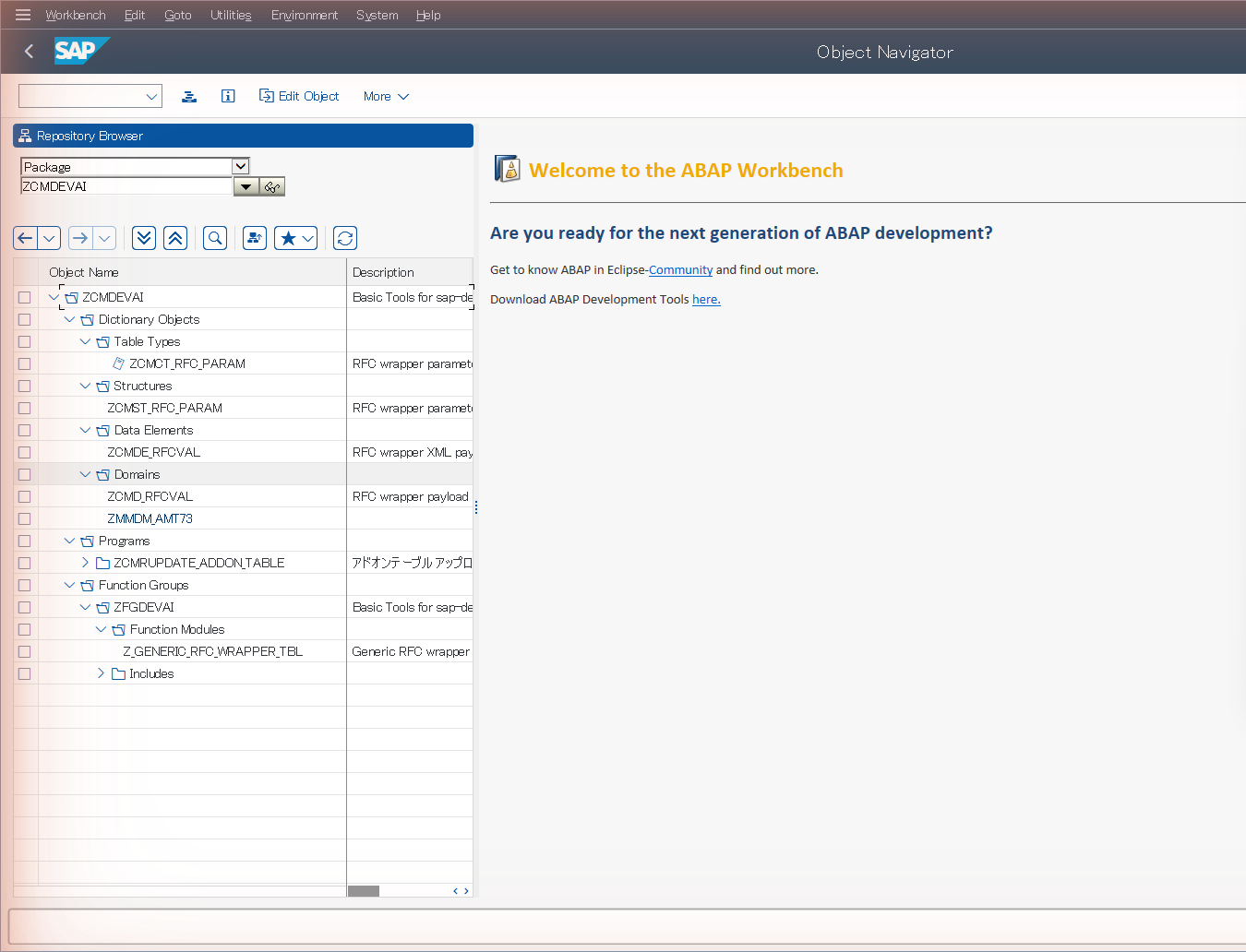
📷 Figure 1 — the objects
/sap-dev-initcreated, shown in the packageZCMDEVAI(SE80). The wrapper FM, the utility program and the DDIC scaffolding are all here.
Check it any time (read-only):
/sap-dev-statusIt prints one line per artefact (TR, package, function group, wrapper FM + its DDIC,
utility program) and a STATUS: summary. Exit code 0 = healthy.
4.4 Confirm everything is healthy — /sap-doctor
Before your first real build, run the read-only preflight:
/sap-doctorIt checks GUI scripting, NCo/config, RFC connectivity, client modifiability, and the
dev-env artefacts, and prints an actionable FIX for every failure. It changes
nothing. Treat a clean /sap-doctor as your green light.
5. The Customer Brief
This is the single most valuable 10 minutes you’ll spend per project. The
Customer Brief is a one-page form that tells /sap-gen-abap your project’s
context — release, namespace, packages, message class, quality bar — so the
generated ABAP fits the customer’s standards instead of being generic.
Copy the template into your custom folder and fill it in:
{work_dir}\custom\customer_brief.md(The shipped template is plugins/sap-dev-core/shared/templates/customer_brief.md;
a filled example is customer_brief_sample.md. A Japanese variant
customer_brief_JA.md is auto-selected when your logon/template language is JA.)
What the brief captures (excerpt):
| Section | Drives… |
|---|---|
| 1. System — ABAP release, Unicode, logon languages, time zone | modern vs classic syntax, codepage handling |
2. Namespace & objects — Z/Y prefix, sub-prefix (ZHK), default package, message class | every generated object name |
| 3. Reusable utilities — existing Z classes/FMs to prefer | MODE_REUSE — don’t re-implement what exists |
| 4. Volumes — small / medium / large per object kind | SELECT SINGLE vs INTO TABLE vs PACKAGE SIZE |
| 5. Authorization — AUTHORITY-CHECK objects per area | generated authority checks |
| 6. Quality bar — ABAP Unit required? ATC gating? modern syntax? OOP? max method length? comment language | which findings block deploy; the shape of the code |
The brief is read by /sap-docs-extract, /sap-gen-abap (mandatory context), and
/sap-check-abap (to decide which findings are blocking). Fill it once; it pays off on
every spec.
6. Generate ABAP from a design document
The sap-gen-code pipeline turns a design document (the functional spec the
customer gives you — Excel, Word, or PDF) into validated ABAP source ready to
deploy. Every step writes plain text files into one work folder, so you can inspect
and hand-edit at any stage.
6.0 The canonical order
(/sap-docs-layout)        # optional: customise the spec workbook layout
 /sap-docs-extract        # REQUIRED: document → structured *.txt files
(/sap-docs-convert)       # optional: apply customer field/type/flag renames
 /sap-docs-check          # recommended: validate the spec (ddic + process dimensions)
 /sap-gen-abap            # REQUIRED: generate Z<PROG>.abap (+ sibling files)
 /sap-check-abap          # recommended: naming / types / SQL / contracts / coverage / CALL FUNCTION / syntax
 /sap-fix-abap            # if check-abap found auto-fixable issues
6.1 Extract — /sap-docs-extract
/sap-docs-extract C:\work\design\CustomerUpload.xlsxInput can be a .xlsx / .docx / .pdf, an existing work folder, or a _raw.txt
(legacy binary .doc is not supported — save it as .docx in Word first). It
creates a work folder and dumps the document into typed text files —
the ones you’ll care about most:
| File | Contents |
|---|---|
{doc}_PGM_summary.txt | program id/name/type/package/release |
{doc}_process.txt | the process logic — the main input to generation |
{doc}_domains.txt / _dataElements.txt / _tables.txt | DDIC definitions |
{doc}_selection_definition.txt | selection-screen fields |
{doc}_errorMsgs.txt | message-class entries |
{doc}_textElements.txt | text symbols |
{doc}_interface.txt | inputs/outputs/exceptions (for FMs) |
{doc}_golden.txt | test scenarios (→ ABAP Unit) |
{doc}_deps.txt | declared dependencies (FMs, BAPIs, tables) |
This step is offline — no SAP connection needed.
6.2 Convert (optional) — /sap-docs-convert
/sap-docs-convert <work-folder> [<rules.tsv>]Applies customer-specific normalisation rules (legacy field name → canonical, legacy
DDIC type → canonical, flag value → key/value) to the extracted files. Skip it if
your spec is already in the toolkit’s expected shape. A .pre-convert/ snapshot is
taken first, so it’s reversible.
6.3 Validate the spec — /sap-docs-check
/sap-docs-check <work-folder> [<sap-logon-description>]   # runs both dimensions by default
/sap-docs-check <work-folder> --dimension ddic            # force just the DDIC dimension
/sap-docs-check <work-folder> --dimension process         # force just the process dimension
One skill, two dimensions (both run by default, whichever inputs are present):
- The ddic dimension validates domains/data elements/tables: naming, valid DDIC types, CURR/QUAN reference completeness, domain↔data-element↔table cross-references. Pass a logon description to also verify against the live dictionary over RFC.
- The process dimension flags vague/contradictory logic, undefined fields/tables, and type mismatches; optionally validates table.field references against live SAP.
Each dimension writes a tab-delimited check_result_*.txt (ddic / process) you can open
in Excel. Only problems are listed — an empty result means clean. Fix issues in the
spec text files, re-run, then proceed.
6.4 Generate — /sap-gen-abap
/sap-gen-abap <work-folder>\{doc}_process.txtThis reads the process file, the sibling _*.txt files, and your Customer Brief,
pre-fetches live FM/structure/authorization signatures over RFC (cached per system),
and emits:
| Output | For |
|---|---|
Z<PROGRAM_ID>.abap | the deliverable — the ABAP source |
Z<PROGRAM_ID>.deps.txt | dependency manifest (hand to Basis) |
Z<PROGRAM_ID>.messages.txt | message-class population → /sap-se91 |
Z<PROGRAM_ID>.text_elements.txt | selection texts + text symbols → /sap-se38 |
Z<PROGRAM_ID>.traceability.txt | spec-section → ABAP-line audit map |
Z<PROGRAM_ID>_TEST.abap | ABAP Unit class (when the brief asks for tests) |
It can generate reports/帳票 (batch), dialog/module-pool programs, and function modules / RFC. The brief steers the details: modern vs classic syntax, OOP vs FORM scaffolds, the performance pattern per volume band, the AUTHORITY-CHECK placement, your message class, and the comment language.
The generator already enforces the rules that usually cause ATC findings — no
SELECT *, no MESSAGE e… inside class methods, no LOOP … WHERE … EXIT, currency
fields carry their reference field, FM call parameters match live signatures, and so
on — so the code is born close to clean.
6.5 Validate the generated code — /sap-check-abap
/sap-check-abap <work-folder>\Z<PROGRAM_ID>.abap # all dimensions (see below)One skill, several dimensions (the former /sap-check-fm is now the fm
dimension; a new syntax dimension was added):
- naming / type / sql / unused / contract / spec / conv — variable naming
(against your rules), data types, SQL field names, unused variables, the
generation contracts (line length,
SELECT *, message routing, text symbols), and spec coverage. Offline by default; add a connection for live type/SQL validation. - fm — validates every
CALL FUNCTIONagainst the real FM signature over RFC (parameter names, sections, mandatory flags, type compatibility, structure fields). Catches a hallucinated parameter before it ever hits SE37. - syntax — a headless compiler-level check (
EDITOR_SYNTAX_CHECKover RFC) that catches real syntax errors offline, before any GUI upload. Self-contained programs are checked directly; an FM fragment or a class/interface pool gets a best-effort pre-insert body check via the engine’s-Wrapmode (findings are line-mapped back to the original file). Only a bare include, or a fragment whose signature is too complex to model, degrades toSYNTAX_COULD_NOT_CHECK— those are syntax-checked in-context by the deploy skill’s Ctrl+F2.
If it finds something auto-fixable, run the fixer (a timestamped .bak is written
first):
/sap-fix-abap <work-folder>\Z<PROGRAM_ID>.abapfix-abap renames naming-violations, comments out unused variables, applies
syntax-safe rewrites, fixes CALL FUNCTION parameters (the former fix-fm, now folded
in), and drives a bounded AI syntax-fix loop. Anything not safely auto-fixable (e.g. a
TYPE_NOT_FOUND) is flagged for you to handle. Re-run the checker until it’s clean.
Each checker writes a tab-delimited result file next to the source
(Z<PROGRAM_ID>.check.tsv for check-abap) — one row per finding with a Code,
Severity, Line, and Fix Advice column you can open in Excel. An empty
result means clean.
7. Deploy the code
Now push the artefacts into SAP. Order matters — DDIC before the program that uses it, message class before the program that messages from it:
1. /sap-se11   <type> <name> <def-file>     # domains → data elements → structures → tables
2. /sap-se91   <MSGCLASS> <messages-file>   # populate the message class
3. /sap-se38   <PROGRAM>  <Z<PROG>.abap>    # (or /sap-se37 for FMs, /sap-se24 for classes)
4. text elements                            # apply Z<PROG>.text_elements.txt (reports)
Every deploy skill: checks if the object exists → creates or updates → syntax-checks
→ saves → activates → and then verifies activation over RFC
(PROGDIR.STATE = A, DWINACTIV, status-bar MessageType = S). It never reports
success on an inactive or syntactically-broken object.
7.1 Programs / reports — /sap-se38
/sap-se38 ZHKMM001R01 C:\sapdev\source_code\work\...\ZHKMM001R01.abapSource can be a file path or pasted ABAP. For a report, the skill also applies
selection-text / text-symbol elements after activation (from the generated
.text_elements.txt). Other modes: check-and-fix (no source → open, syntax-check,
fix, re-upload, activate), change-attributes (title/status/type), and delete
(asks first).
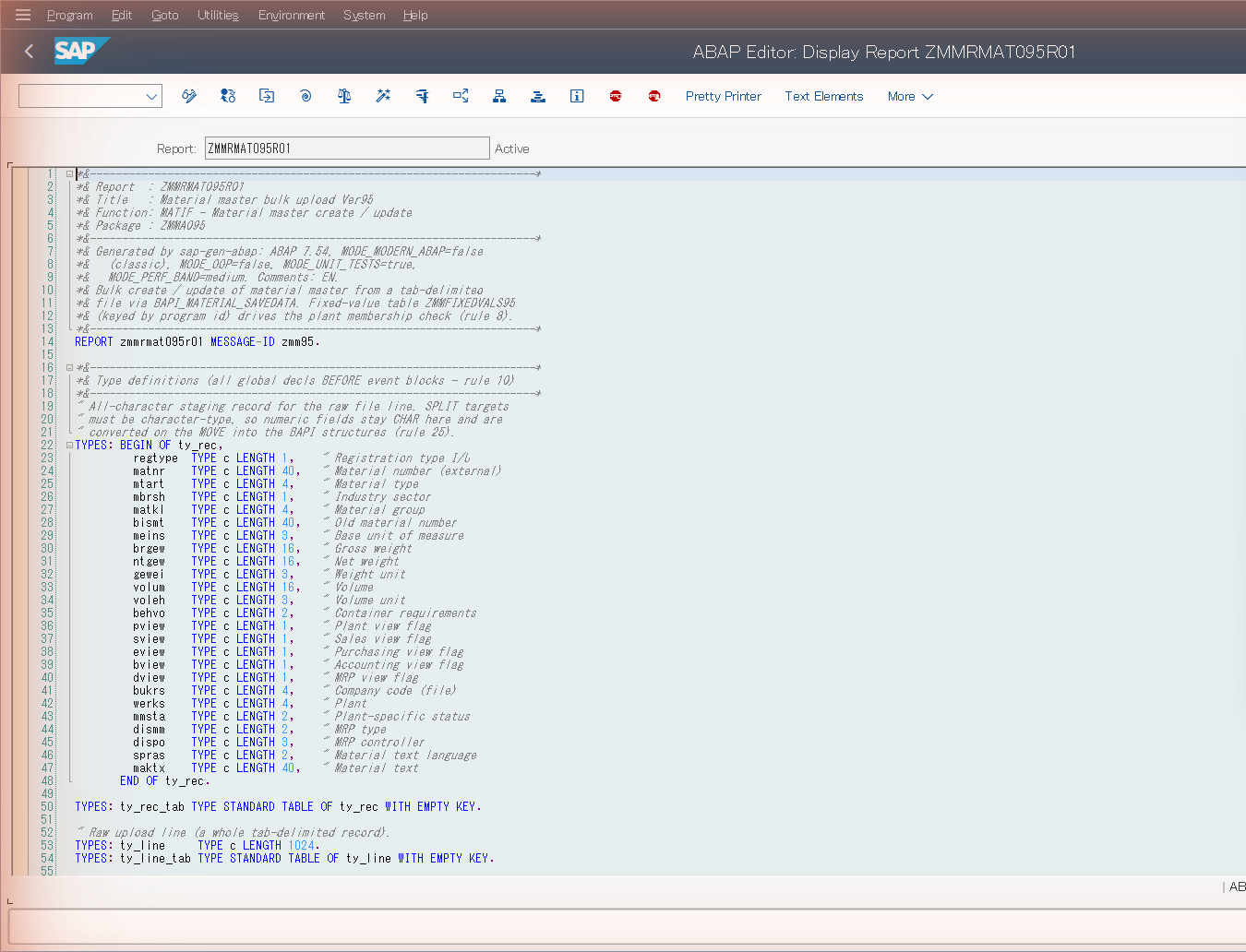
📷 Figure 2 — a report generated by
/sap-gen-abapand deployed with/sap-se38, shown Active in SE38 on the S4G demo system. The generated header comment block records theMODE_*flags the generator derived from the Customer Brief (ABAP 7.54, classic syntax, unit tests on, medium volume band, EN comments).
7.2 Function modules — /sap-se37
/sap-se37 Z_HK_UPLOAD_FILE C:\...\Z_HK_UPLOAD_FILE.abap --function-group=ZHKFG01Source must be the full function include (FUNCTION … ENDFUNCTION. with the
*"Local Interface: block). Modes also include change-attributes (short text /
processing type / make remote-enabled), reassign to another function group, and delete.
7.3 Classes & interfaces — /sap-se24
/sap-se24 ZCL_HK_UPLOAD_PROCESSOR C:\...\ZCL_HK_UPLOAD_PROCESSOR.abap
/sap-se24 ZCX_HK_ERROR <file> --exception --with-message   # exception class tied to T100
/sap-se24 ZCL_HK_FOO <file> --test-source=<test.abap>        # deploy WITH local test classes
Source is the complete CLASS … DEFINITION … IMPLEMENTATION … ENDCLASS. (The
toolkit handles the UTF-8/encoding details for you.)
7.4 DDIC objects — /sap-se11
/sap-se11 DOMAIN       ZHKDM_AMT     <def.tsv>
/sap-se11 DATAELEMENT  ZHKDE_AMOUNT  <def.tsv>
/sap-se11 STRUCTURE    ZHKS_ITEM     <def.tsv>  --enhancement-category=NOT_EXTENSIBLE
/sap-se11 TABLE        ZHKT_LOG      <def.tsv>
Handles all nine DDIC types (table, view, data element, structure, table type, type group, domain, search help, lock object) from tab-delimited definition files. Pre-checks referenced domains/data elements, sets the enhancement category for tables/structures, and RFC-verifies the active version after activation. (Delete mode exists too, with confirmation.)
Definition-file gotcha:
.def/.tsvfiles must contain real TAB bytes, not the literal characters\t. If you write them with a plain text tool, make sure tabs are tabs. The skill auto-repairs the common corruption, but real tabs are safest.
7.5 Message classes — /sap-se91
/sap-se91 ZHKMSG01 <messages.txt> # e.g. the generated Z<PROG>.messages.txtMessages are tab-separated number<TAB>text (placeholders &1–&4). Creates the
class if needed; reuses an existing message number when the text already exists.
7.6 Stragglers — /sap-activate-object
If anything is left inactive (e.g. a failed activation), activate it standalone:
/sap-activate-object PROGRAM ZHKMM001R01
/sap-activate-object CLASS   ZCL_HK_UPLOAD_PROCESSOR
It routes by type to the right transaction, handles the inactive-objects worklist
popup automatically, and verifies via PROGDIR / DWINACTIV.
7.7 How transports are handled — you never type a TR into a deploy skill
Every deploy skill that needs a transport request asks /sap-transport-request,
the single entry point that applies your way_to_get_transport_request policy
(DEFAULT / ASK / CREATE_NEW). When a new TR is needed it delegates to
/sap-se01 (which defaults to a Workbench request and renders the description from
your template). You set the policy once in /sap-dev-init; after that, deploys just
flow — the right TR is resolved for you, and task TRs are isolated per conversation
so parallel work never clobbers a shared default.
You can still manage TRs directly when you want to:
/sap-se01 create W "ZHK month-end report"   # create a workbench TR
/sap-se01 release DEVK900123                 # release (asks first — irreversible)
/sap-se01 delete  DEVK900123                 # delete an unreleased TR (asks first)
8. Quality gates
8.1 ATC — /sap-atc
Run the ABAP Test Cockpit end-to-end as a gate:
/sap-atc PROGRAM ZHKMM001R01
/sap-atc PROGRAM ZHKMM001R01 --variant=S4HANA_READINESS --max-priority=2
It builds an object set, creates and runs an ATC run series, polls the monitor until
done, and reads the Priority 1 / 2 / 3 finding counts. It applies your
MAX_PRIORITY gate (default 2 → P1 and P2 block; P3/P4 warn) and writes the
findings to a TSV. On a FAIL it drills into the per-finding detail automatically.
PRIORITY_COUNTS: P1=0 P2=1 P3=3
GATE_VERDICT: FAIL  P1=0 P2=1 P3=3 (threshold=2 → P2 blocks)
FILE: …\ATC_R_260709_101500.txt.findings.tsv (4210 bytes)
Object types: PROGRAM, CLASS, INTERFACE, FUGR, DDIC, … (for a function
module, pass its FUGR). Fix the findings (often via /sap-fix-abap or a targeted
edit + re-deploy), then re-run until GATE_VERDICT: PASS.
8.2 ABAP Unit — /sap-run-abap-unit
If the generator produced a test class (because your brief asked for tests), run it:
/sap-run-abap-unit ZHKMM001R01_TEST
/sap-run-abap-unit ZCL_HK_UPLOAD_PROCESSOR --with-coverage --min-coverage=80
It executes the unit tests via SE38/SE24, reports per-method pass/fail, and gives a
verdict. --with-coverage additionally measures code coverage and can gate on a
minimum percentage.
9. Transport readiness, release, and STMS
9.1 Pre-release gate — /sap-transport-readiness
Before you release, check the TR is actually shippable:
/sap-transport-readiness --current                 # the conversation's dev TR
/sap-transport-readiness DEVK900123 --run-atc --include-unit-tests --strict
RFC, read-only. It checks for unreleased child tasks, inactive objects, local/$TMP objects sitting in a transportable request, and (optionally) folds in ATC and ABAP-Unit verdicts. It rolls everything up to GO / GO_WITH_WARNINGS / NO_GO with a per-finding remediation list and an honest “could not check” section.
READINESS: tr=DEVK900123 verdict=GO_WITH_WARNINGS block=0 warn=2 info=1 objects=5Exit 0 = safe to release; exit 1 = NO_GO, fix first.
9.2 Release — /sap-se01 release
/sap-se01 release DEVK900123Releases the request and its tasks. Irreversible — it asks you to confirm first.
9.3 Move it through the landscape — /sap-stms
Read the import queues and logs, and import a released TR through DEV → QAS → PRD:
/sap-stms status DEVK900123 --route          # where is it in the route?
/sap-stms import DEVK900123 --to S4Q          # import into QAS
/sap-stms logs   DEVK900123 --system S4Q      # read the return code (RC) afterwards
/sap-stms reads the real return code from the import log (RC 0 = OK, 4 = warnings,
8 = error, 12 = fatal) — it does not trust the “done” row in the queue.
Production is deliberately hard to do by accident. Importing into a production system (a SID on the production allow-list) requires you to type the target SID back and explicitly confirm, after the skill shows you the TR’s object inventory. There is no shortcut flag. This is the toolkit refusing to let a stray command touch production.
10. A complete worked example
Scenario: the customer handed you MaterialUpload.xlsx, a spec for a report that reads
a file of materials and creates them. Your brief sets sub-prefix ZHK, package
ZHKA011, message class ZHKMSG01, ABAP Unit “mandatory”, ATC “priority 1+2 gating”.
# --- one-time, already done: /sap-login, /sap-dev-init, customer_brief.md filled ---

# 1. Generate
/sap-docs-extract C:\sapdev\design_docs\MaterialUpload.xlsx
/sap-docs-check         C:\sapdev\source_code\work\MaterialUpload_20260626\
/sap-gen-abap C:\sapdev\source_code\work\MaterialUpload_20260626\MaterialUpload_process.txt
/sap-check-abap C:\sapdev\source_code\work\MaterialUpload_20260626\ZHKMM001R01.abap
#   → if findings: /sap-fix-abap … then re-check until clean

# 2. Deploy
/sap-se91 ZHKMSG01 C:\sapdev\source_code\work\MaterialUpload_20260626\ZHKMM001R01.messages.txt
/sap-se38 ZHKMM001R01 C:\sapdev\source_code\work\MaterialUpload_20260626\ZHKMM001R01.abap
#   (apply the generated text elements when prompted)

# 3. Prove
/sap-atc PROGRAM ZHKMM001R01 --max-priority=2
/sap-run-abap-unit ZHKMM001R01_TEST

# 4. Ship
/sap-transport-readiness --current --run-atc --include-unit-tests
/sap-se01 release <your-TR>
/sap-stms import <your-TR> --to S4Q
In practice you won’t type most of this — you’ll say “generate the MaterialUpload report from this spec, check it, and deploy it to DEV” and approve each gated step as Claude reaches it. The commands above are what’s happening under the hood.
10.1 — Shortcut: hand the whole loop to the abap-developer agent
Everything in §6–§8 can be driven for you by a single sub-agent — abap-developer
(ships with sap-dev-core). It’s a senior-ABAP-developer persona that reads your
Customer Brief, sets the MODE_* flags from it, and orchestrates the /sap-* skills
end-to-end. You describe the outcome; it runs the pipeline, pausing at every gated
step for your approval. It has three modes, chosen by how you phrase the request:
| Mode | Say something like… | What it runs |
|---|---|---|
| build | ”build ZHKMM001R01 from …\MaterialUpload.xlsx and deploy to DEV” | extract → validate spec → DDIC + message class → generate → check/fix → (asks you) → deploy → activate → text elements → ATC → unit tests |
| fix | ”fix ZHKMM001R01” / “make ZLEGACY_RPT ATC-clean” | /sap-check-fix dispatcher (≤3 auto-fix rounds) → ATC re-check → report |
| deploy | ”deploy …\ZHKFOO.abap to DEV” | classify source → verify dependencies → (asks you) → resolve TR → deploy → ATC |
Invoke it by naming it, or just phrase the task — Claude dispatches to it automatically:
You: Use the abap-developer agent to build the MaterialUpload report from
C:\sapdev\design_docs\MaterialUpload.xlsxand deploy it to DEV.
The agent then runs, on its own:
- Pre-flight — resolves your work dir; reads
customer_brief.mdand setsMODE_OOP / MODE_UNIT_TESTS / MODE_PERF_BAND / ATC_MAX / …; confirms a live SAP session (runs/sap-loginif needed); checks it’s pinned to the system you named (so a “deploy on S4H” can’t silently land on S4D); and runs/sap-dev-statusto confirm the dev-init artefacts exist. - Build —
/sap-docs-extract→/sap-docs-check→ deploys the spec’s DDIC objects (/sap-se11) and message class (/sap-se91) →/sap-transport-request→/sap-gen-abap→/sap-check-abap(all dimensions, +/sap-fix-abap, up to 3 rounds). - Asks you before the first write to SAP:
“Generated
ZHKMM001R01.abap(320 lines). Tests:ZHKMM001R01_TEST.abap(4 methods). Quality checks pass. Plan: deploy to packageZHKA011under TRDEVK900123, activate, run ATC priority ≤ 2. Proceed? (yes / show source / cancel)” - Deploy + prove — on your yes:
/sap-se38(deploy → activate → apply text elements) →/sap-atc→ deploys + runs/sap-run-abap-unit. - Final report — a SUMMARY (mode, status, objects, TR, ATC result, tests), an ARTIFACTS list (source, deps, traceability, transcript), and NEXT STEPS.
What the agent will not do, by contract (it cites the rule file when it refuses):
- Deploy anything without your explicit “yes” (step 3 above).
- Hand-write ABAP — generation always goes through
/sap-gen-abap(which has the live FM / AUTHORITY-CHECK / DDIC-structure caches that hand-written code can’t consult). - Bypass an ATC priority-1/2 finding — it surfaces them and lets you decide.
- Rename your spec’s objects silently — if a name already exists on the target system it stops and asks (reuse-in-place / suffix-bump / abort).
- Write SQL against SAP standard tables, or prompt you for a TR number directly.
Every skill call is appended to an audit transcript at
{work_dir}\temp\abap_developer_transcript_*.txt — the “what did it do, and why” trail
you can read the next morning.
A real, complete prompt. In practice you give richer instructions than one line —
the agent maps each clause to a step or a MODE_* flag. A real build prompt looks like
this (the spec here is a filled-in copy of the shipped workbook template
plugins/sap-dev-core/shared/templates/spec_template.xlsx — substitute your own):
Please create the corresponding program using abap-developer based on the following design document and deploy it to the S4D system.
Create the packages and new requests specified in the design document and use them as the default selections for this task.
Please execute the complete process, avoiding the use of previously generated code. Please use SAP’s login-language text as code comments.
After deploying the program, create three materials using this program.
Generate the unit-test program and execute it successfully.
Please log in to the SAP system using EN.
Record any issues found.
C:\sapdev\design_docs\spec_MaterialUpload_EN.xlsx
How the agent reads each instruction:
| Your words | What the agent does |
|---|---|
| ”deploy it to the S4D system” + “log in … using EN” | runs /sap-login --lang EN, then confirms the session is pinned to S4D (Step 0.3a) — and stops to ask if it’s pinned somewhere else |
| ”Create the packages and new requests specified in the design document and use them as the default selections for this task” | resolves the spec’s package + a new transport request, creates them, and pins them as this conversation’s session dev defaults so every later skill reuses them |
| ”execute the complete process, avoiding the use of previously generated code” | runs the full build pipeline fresh; RFC-verifies the spec’s object names are collision-free on S4D and uses them verbatim (asks before reusing/suffix-bumping an existing name) |
| “use SAP’s login-language text as code comments” | sets MODE_COMMENT_LANG to the logon language (EN here) |
| “Generate the unit-test program and execute it successfully” | emits Z…_TEST.abap, deploys it, and runs /sap-run-abap-unit — a failing run stops the build |
| ”create three materials using this program” | after activation, runs the deployed report to create three materials as a smoke test |
| ”Record any issues found” | logs every problem to the run transcript and surfaces them in the final report |
the …\spec_MaterialUpload_EN.xlsx path | the design document handed to /sap-docs-extract |
You still approve the single gated “Proceed?” prompt before the first write to SAP.
The companion
cc-migration-engineeragent (insap-migrate) does the same kind of orchestration for an S/4HANA custom-code migration campaign.
11. Day-2 skills
Beyond green-field build-and-deploy, the toolkit covers the work an SIer actually spends most time on:
Understand existing code
/sap-explain-object PROGRAM ZLEGACY_REPORT     # source + call map + explanation dossier
/sap-where-used-list TABLE ZHKT_LOG            # cross-reference
/sap-impact-analysis PROGRAM ZLEGACY_REPORT    # risk band before you change it
/sap-compare PROGRAM ZHKMM001R01               # same object across two saved systems
/sap-explain-object ZHKMM001R01 --spec         # turn an object into a spec document
Diagnose & fix incidents
/sap-diagnose "users get a dump posting goods receipt"   # fans out ST22/SM13/SM12/SLG1/SM37
/sap-st22 --deep                                          # short-dump detail
/sap-fix-incident <root-cause>                            # test-first fix in DEV, behind a TR
/sap-fix-incident closes the loop from a root cause to a test-verified custom-code
fix deployed in DEV behind a transport — gated, never touching standard code or
production.
Run reports, background jobs & app-server files
/sap-run-report ZHKMM001R01 --variant=MONTH_END      # foreground (SA38 F8); always confirms first
/sap-run-report ZHKMM001R01 --background --values="P_BUKRS=1000;S_MATNR=BT:A,M"
/sap-run-report variant list ZHKMM001R01             # variants: list | show | set | delete
/sap-job schedule ZHKMM001R01 --variant=MONTH_END --period=daily --start=20260801020000
/sap-job list --user=DEVELOPER --status=R            # also: status / log / spool / cancel / delete
/sap-file-transfer upload in.csv /tmp/in.csv --text  # PC → app server (CG3Z); download = CG3Y
/sap-file-transfer list /usr/sap/trans               # app-server directory listing over RFC
Running a report is a different risk class from deploying it — it may change data —
so /sap-run-report and /sap-job schedule always stop for explicit confirmation
before executing (cancel / delete confirm too; the monitoring verbs run unprompted).
Background runs prefer the headless RFC fast-path through Z_RUN_REPORT (deployed by
/sap-dev-init) and capture the job’s spool via /sap-sp02, degrading to GUI
scheduling when RFC is unavailable. /sap-file-transfer (text or binary, overwrite
only with an explicit --overwrite) touches no repository object — no transport
request involved — and closes the file-interface test loop: upload the test input →
run the report → download the output → diff against the spec’s expected file.
S/4HANA custom-code migration (the sap-migrate plugin)
/sap-cc-campaign init        # start a tracked migration campaign
/sap-cc-inventory            # enumerate custom Z/Y objects in scope
/sap-cc-usage                # overlay runtime usage → what's actually used
/sap-cc-analyze              # S/4HANA-readiness ATC over the kept objects
/sap-cc-triage               # classify findings into remediation tiers
/sap-cc-remediate            # auto-fix the mechanical (R1) changes on a sandbox
12. Safety model
The toolkit is built to be trusted on a customer landscape. The guarantees:
- No silent writes to SAP standard tables. Mutations go through SAP’s own write APIs; if none exists, the skill stops and asks.
- No unsolicited deployment. Skills don’t create or deploy objects unless you asked (or the skill is a deploy skill you invoked).
- Every irreversible action confirms. TR release, object delete, report execution / job scheduling (a report is not assumed read-only), and production STMS import all stop for explicit confirmation; production additionally requires you to type the SID back.
- No false success. Deploys verify activation over RFC; ATC reads the real priority columns; STMS reads the real return code. “Couldn’t check” is reported as such, never as “passed”.
- Your credentials, your machine. Passwords are DPAPI-encrypted, decryptable only by your Windows account on this workstation, and never leave it.
- One conversation = one SAP session. The session broker keeps parallel conversations from driving each other’s session.
13. Troubleshooting & FAQ
/sap-login says “Could not get SAP Scripting Engine.”
Scripting is disabled on your client. Enable it (SAP Logon → Options → Scripting) and
restart SAP Logon. If it still fails, the server parameter sapgui/user_scripting is
FALSE — ask Basis to set it TRUE (RZ11).
A skill stalls on a “SAP GUI Security” popup.
That’s the file-IO trust dialog. /sap-dev-init Step 3 pre-trusts your work dir for
the current Windows account. If it reappears, re-run /sap-dev-init (or close all SAP
Logon windows and restart once so the rule persists).
RFC steps say “destination not found” / NCo errors. SAP NCo 3.1 must be the 32-bit, .NET 4.0 build installed into the GAC. The skills call it from Windows PowerShell 5.1 (32-bit). Reinstall with the “Install assemblies to GAC” option. Everything non-RFC still works without it.
My TR was released and now deploys fail.
/sap-dev-init self-heals a stale dev TR; or set a new one. With way_to_get_transport_request=ASK
you’ll simply be asked for a TR on the next deploy.
A deploy “succeeded” but the object isn’t active.
It won’t — the skills RFC-verify activation and report ACTIVATION_FAILED /
COULD_NOT_CHECK rather than a false success. Read the reported activation log line and
fix the cause (often a missing DDIC dependency you need to deploy first).
CJK comments/text come out garbled.
Don’t change chcp or the system locale. The skills carry CJK correctly over UTF-8 and
RFC regardless of your console. See the
Windows shell & encoding FAQ. To see CJK on
screen, use Windows Terminal with a CJK font.
I have two customers open at once.
Use one claude conversation per system, each pinned with /sap-login --switch <SID>.
The broker isolates the SAP sessions; per-connection settings keep each customer’s TR
policy / package / function group separate.
Where did my generated files go?
Under {work_dir}\source_code\work\{doc_name}_{timestamp}\. The work folder is never
auto-deleted — inspect or hand-edit any _*.txt and the .abap there.
How do I see what the skills did?
/sap-log-analyze summarises the JSONL run logs (per-skill counts, success/fail rates,
p50/p95 duration, top error classes).
Appendix A — Full skill catalogue
sap-dev-core (foundation + ABAP Workbench)
| Skill | Purpose |
|---|---|
sap-login | Connect + multi-profile connection store (DPAPI-encrypted), AI-session pin |
sap-dev-init / sap-dev-status / sap-dev-clean | Bootstrap / report / tear down the dev environment |
sap-doctor | Read-only environment preflight with a FIX per failure |
sap-transport-request / sap-se01 | TR resolution policy / TR create-release-delete |
sap-se38 / sap-se37 / sap-se24 / sap-se11 / sap-se91 | Deploy programs / FMs / classes / DDIC / message classes |
sap-se21 / sap-function-group | Create / check / delete a development package / function group |
sap-se41 / sap-se51 / sap-se54 | PF-status / screens / table-maintenance dialog |
sap-se16n | Query any table → tab-delimited download |
sap-se19 / sap-cmod | BAdI implementations / enhancement projects |
sap-snro | Number range objects |
sap-activate-object / sap-change-package / sap-where-used-list | Activate / move package / cross-reference |
sap-atc / sap-run-abap-unit | ATC gate / ABAP Unit runner |
sap-check-abap / sap-fix-abap | Validate / auto-fix ABAP quality — naming, types, SQL, CALL FUNCTION signatures, compiler syntax |
sap-transport-readiness / sap-impact-analysis / sap-enhancement-advisor / sap-evidence-pack | Delivery assurance |
sap-stms | Import a released TR through the landscape (gated PROD) |
sap-diagnose + sap-st22 | Incident triage (SM13/SM12/SLG1/SM37 RFC readers built in — --reader <name> runs one standalone) + ST22 dump reader |
sap-run-report | Execute a report foreground/background (variants, ad-hoc values; always confirms first) |
sap-job | Background-job lifecycle — schedule / list / status / log / spool / cancel / delete |
sap-file-transfer | PC ↔ app-server file transfer (CG3Z / CG3Y) + RFC directory listing |
sap-sp02 | Display / export spool output requests |
sap-fix-incident / sap-check-fix | Test-first fix loop / check-and-fix router |
sap-trace | Analyse a recorded performance trace |
sap-explain-object / sap-compare | Comprehension (--spec emits a formal spec document) / cross-system diff |
sap-rfc-wrapper | Call non-RFC FMs (fm) / wrap class methods (class) over RFC |
sap-call-bdc / sap-update-addon | BDC replay / add-on table maintenance |
sap-gui-probe / sap-gui-inspect / sap-gui-skill-scaffold | Skill-authoring & GUI robustness tooling (--record captures by hand; golden-screen drift → /sap-doctor --screens) |
sap-log-analyze / sap-error-kb | Log summary / frequently-errors knowledge base |
sap-se14 | Adjust / activate a DDIC database object (DB utility) |
sap-sm12 | Lock-entry (SM12) inspection |
sap-sql-query | Read-only SQL SELECT over RFC |
sap-version-history | Repository-object version history |
sap-git | Serialize repository objects to a git working tree (deterministic snapshots) |
sap-forms | Inventory + parse SmartForms / SAPscript / Adobe forms |
sap-vofm | VOFM routines (requirements / formulas) |
sap-scratch-run | Run an ad-hoc ABAP snippet |
sap-api-advisor | Recommend the released API (BAPI / RFC / CDS) for a task |
sap-gen-code (spec → ABAP)
| Skill | Purpose |
|---|---|
sap-docs-layout | Edit the spec-workbook layout |
sap-docs-extract | Document → structured _*.txt files |
sap-docs-convert | Apply customer normalisation rules |
sap-docs-check | Validate the spec (DDIC + process dimensions) |
sap-gen-abap | Generate ABAP (report / dialog / FM) |
sap-gen-abap-unit | Generate ABAP Unit tests for an existing object and run them to green on the live system (seam analysis, bounded fix loop) |
sap-gen-cds | Generate + deploy a CDS view over RFC without ADT (classic DDL on 7.50–7.54, view entities on 7.55+) |
sap-review-abap | AI semantic + security code review of an ABAP object or local file (advisory) |
sap-docs-estimate | Estimate development effort from an extracted spec |
sap-gen-idoc-handler | Generate an inbound IDoc handler (process code + FM) |
sap-gen-rap | Generate a RAP business object (behaviour + projection) |
sap-gen-test-plan | Generate + RFC-validate a functional test plan |
(sap-check-abap / sap-fix-abap moved to sap-dev-core — see the table above.)
sap-migrate (S/4HANA custom-code migration)
sap-cc-campaign, sap-cc-inventory, sap-cc-usage, sap-cc-analyze,
sap-cc-triage (incl. --learn flywheel), sap-cc-remediate, sap-cc-decommission,
sap-cc-cloud-readiness, sap-spau-triage (SPAU note adjustment),
sap-exit-modernize (customer exit → BAdI).
sap-project (functional / operations delivery) — ships the sap-consultant agent
- Test data & regression —
sap-bp,sap-mm01,sap-va01,sap-tcd-chain(headless O2C chain),sap-fi-post,sap-golden-master,sap-mass-load,sap-test-replay - Incident & interface diagnosis —
sap-doc-flow,sap-output-diagnose,sap-idoc,sap-rfc-monitor,sap-change-history,sap-sost,sap-workflow,sap-gateway-service,sap-interface-inventory - Authorizations & users —
sap-auth-diagnose,sap-suim,sap-explain-role,sap-su01(DEV-only),sap-pfcg,sap-auth-requirements - Release & transport ops —
sap-release-notes,sap-delivery-report,sap-transport-copies,sap-transport-sequencer,sap-refresh-verify,sap-cutover-runbook,sap-retrofit,sap-note-status - Config & customizing —
sap-config-compare,sap-img-find,sap-sm30,sap-translate(SE63),sap-sm35(batch input) - Health & data —
sap-health-check,sap-data-volume - Fiori & docs —
sap-fiori-flp-audit,sap-user-guide
Appendix B — Settings reference
Resolved across tiers (highest first): env var SAPDEV_AI_WORK_DIR (work_dir only) →
settings.local.json → {work_dir}\runtime\userconfig.json → plugin settings.json.
You rarely edit these by hand — the skills write them. Key ones:
| Key | Default | Set by |
|---|---|---|
work_dir | C:\sap_dev_work | env var / /sap-login onboarding |
way_to_get_transport_request | DEFAULT | /sap-dev-init |
sap_dev_transport_request | blank | /sap-dev-init, /sap-transport-request |
sap_dev_package | ZCMDEVAI | /sap-dev-init |
sap_dev_function_group | ZFGDEVAI | /sap-dev-init |
rule_of_tr_description / tr_description_template | ASK / blank | /sap-dev-init |
sap_dev_mode | GUI | per connection |
fm_cache_enabled / fm_cache_ttl_*_days | true / 30 / 1 | userconfig |
log_* | see CLAUDE.md | userconfig |
Per-connection dev defaults (TR / package / function group / mode / TR policy) live in
connections.json[<id>].dev_defaults and are isolated per conversation × connection,
so concurrent work never clobbers a shared default.
Appendix C — ABAP naming & length limits
The generator and checkers enforce these; know them when you hand-edit.
| Object | Max length | Convention |
|---|---|---|
PARAMETERS / SELECT-OPTIONS | 8 incl. prefix | p_bukrs, s_matnr |
| Variable / class / method / local type | 30 | lv_…, ls_…, lt_…, gv_…, gc_… |
| Function module / domain / data element / table / structure | 30 | Z… / Y… |
| Message class / function group | 20 | ZHKMSG01 / ZHKFG01 |
| Program / report | 40 | ZHKMM001R01 |
| Global class / exception class | 30 | ZCL_… / ZCX_… |
Variable prefixes (abap_naming_rules.tsv, overridable per project): lv_/ls_/lt_
local var/struct/table, gv_/gs_/gt_ global, gc_/lc_ constants, p_
parameters, s_ select-options.
Source convention: keep lines ≤ 72 columns; comments/UI text in the spec’s natural
language; comments in MODE_COMMENT_LANG (default = SAP logon language). DDIC
definition files use real TAB bytes.
The skills evolve — when in doubt, the SKILL.md of
each skill is the source of truth, and /sap-doctor tells you whether your environment
is ready. Questions: https://github.com/sapdev-ai/sap-dev/issues · https://sapdev.ai.